Visit the AwardSpring homepage and sign in with your MacID and password.
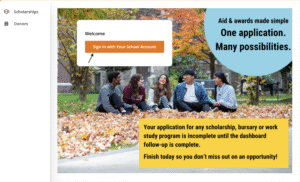
AwardSpring Login page
On the left sidebar, click “Application”and complete the General Application.
This short questionnaire asks about your program and background so AwardSpring can create a personalized list of awards just for you. It takes less than 15 minutes to complete. The platform will then find the awards you’re eligible for and display them on your dashboard
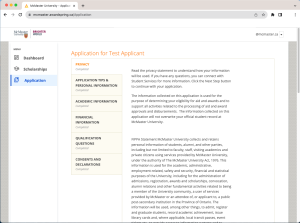
The General Application in AwardSpring. Complete this first to start finding awards.
Privacy: Read the privacy statement to understand how your information will be used. Click the Next Step button to continue with your application.
Application Tips & Personal Information: Please review the application tips before continuing.
- Complete the voluntary self-identification questions as they apply to you.
- AwardSpring pulls some of your contact information from Mosaic so the questions you are asked may differ from a friends’.
Academic Information: The Academic Information tab is quick and easy – we’ll pull most of your program information from Mosaic.
Financial Information: If you would like to be considered for need based opportunities such as bursaries and the work program, select “Yes” to the first question, and complete all questions on the Financial Information tab.
Qualification Questions: In the Qualification Questions tab, you will have the opportunity to tell us more about yourself. Please note that your responses won’t impact the amount you are eligible for, only the sources it comes from.
Consents & Declarations: Read and complete this final section and submit your General Application.
Tip: You won’t able to click submit until all the required questions in each sections are complete.
Uploading documents:
Please save your documents as a PDF and ensure there are no foreign characters in the file name, as it will prevent the file from opening.
For our fillable forms, complete the form and select File > Print. Choose Adobe PDF as the printer in the Print dialog box. Click Print. Name your file, and save it to your computer. Upload the completed document to AwardSpring.
On AwardSpring’s Dashboard, you will find a “Follow-ups” section. This is where you apply for individual awards with extra criteria like references, essays, etc. You must complete these before the application deadline listed on the award. If the award requires a reference, finish the Follow-ups early to give your referee time to respond.
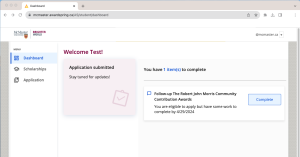
Awards appear in AwardSpring throughout the school year. Make sure you check back frequently to see what new awards are available.
You’ll be able to view all the awards you’ve been automatically applied to or completed the follow up requirements for, listed under the Scholarships Tab with an “Applied” status.
Application Statuses:
- Applied: Your application is complete and submitted.
- Denied: You no longer meet the eligibility requirements (i.e. if you withdraw prior to the application deadline, you will be removed from the applicant pool, or if you have a significant change in financial status)
- Approved: If you continue to meet all eligibility requirements when the application period closes your application status will appear as Awarded ($1). For the general bursary this does not mean that you are guaranteed bursary funding but that your application is undergoing a final assessment in Mosaic.
Monitor your dashboard regularly and be sure to add awardspring.ca to your ‘safe senders’ list to receive status updates via email.
Payment timeline
- Fall: Payments for entrance bursaries, entrance awards and most scholarships
- Early December: Medicine student bursary payments
- Mid-December: MBA student bursary payments
- Mid-February: General bursary payments
Visit our Dates & deadlines page for for a detailed timeline and application deadlines for AwardSpring, organized by funding type throughout the school year.
Collect your money
If you receive an award, the value will not be listed in AwardSpring. Bursaries and most scholarships are paid directly to your McMaster student account and can be viewed in your Mosaic Student Centre. If there is a credit on your account after it is applied to your tuition and certain fees, the amount with be refunded to your personal bank account.
After receiving your award
McMaster encourages award recipients to share a message of appreciation with your donor(s). The individuals and organizations who fund student awards value hearing how their support has made a difference in your academic journey.
Complete the award recipients appreciation form to help donors see the impact of their generosity and strengthen the connection between students and the community that supports them.
Frequently asked questions
I’m having problems with AwardSpring, who can help me?
Have technical questions about AwardSpring? Ask us here!
Not technical? Reach out to our Student Services Professionals.
Where’s the General Bursary Program? I can’t find it.
While completing the General Application, select “Yes” for the first question in the Financial Information section “Would you like to be considered for aid that requires you to demonstrate financial need?”.
If you demonstrate financial need on your General Application, you will be automatically applied! Once applied, you can find it in the “Scholarships” tab if you filter for “Applied.”
When are the deadlines?
Check out the Dates and Deadlines page for important dates. Individual awards will list their deadlines in AwardSpring.
AwardSpring is asking me for “proof of Indigeneity.” What do I submit?
To be considered for Indigenous-specific awards and opportunities, you must upload documentation. You can find a list of the approved documents in the General Application.
Note that results of DNA testing (like 23andMe or Ancestry DNA) are not accepted.
I completed the General Application and there’s no awards listed. What happened?
You will be matched with funding opportunities as applications open. See the “Dates, deadlines and timelines” section for more info on when applications open for different opportunities.
Can I see what awards are available before I go to AwardSpring?
Yes! Use the Funds Finder to discover awards that will match your criteria. You can filter our list of awards by your citizenship status, type of award, program and much more.
AwardSpring lists awards that I can’t apply for. What went wrong?
Sometimes AwardSpring matches you to awards that don’t meet your criteria due to technical issues. It’s important to read about each award you apply for before submitting an application.
Are all scholarships on AwardSpring?
No. There are many external award opportunities that you can apply for on your own. You can find a sampling of external awards on our Scholarships page and you can research them on your own.
Can you explain the status fields on the Scholarships tab?
Complete Follow-Up – There are additional requirements for you to complete. Navigate to your dashboard and click the button on the associated scholarship.
How do I combine multiple documents into one pdf to upload to AwardSpring?
How to Combine PDFs:
- Software that is capable of combining PDFs
- Scan all your documents together to create one pdf.
- Take screenshots, paste them into a Word document and save as a pdf.
Please do not password protect your pdf documents.
Why does the application status say “Closed” after I’ve submitted my application?
Once the application deadline date has passed, the status of an award will be listed as “Closed” as applications are no longer being accepted.